
What we’ll build today
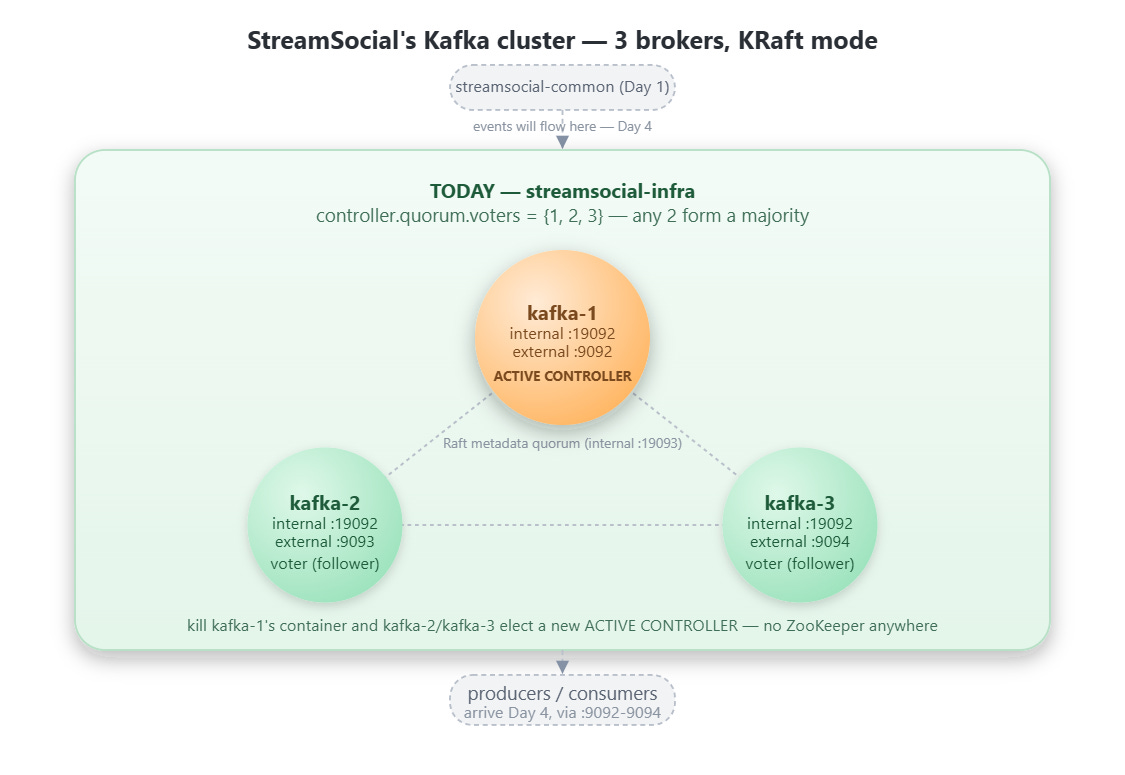
A real 3-broker Kafka cluster running in KRaft mode — no Zookeeper anywhere in the stack
streamsocial-infra: Docker Compose, health checks, and scripts, sitting alongsidestreamsocial-commonfrom Day 1A controller quorum you can actually kill a node in and watch re-elect itself
Why KRaft, not Zookeeper
For most of Kafka’s life, the cluster’s metadata — which broker leads which partition, which topics exist, which consumer groups own what — lived in a separate Zookeeper ensemble. That meant running and operating two distributed systems to get one working Kafka cluster: Kafka itself, and Zookeeper underneath it holding the metadata Kafka depended on to function at all.
KRaft (Kafka Raft) removes that second system. Kafka’s own brokers — or a designated subset of them — now run a Raft consensus protocol directly to agree on cluster metadata. One system, one thing to operate, one thing to reason about when something goes wrong. This isn’t a minor internal refactor; it’s the reason a 3-node cluster today is three Kafka containers instead of three Kafka containers plus three (or five) Zookeeper containers watching over them.
Broker roles and the controller quorum
In KRaft mode, every node runs with a process.roles setting of broker, controller, or both. A broker serves client reads and writes — the thing producers and consumers actually talk to. A controller participates in the metadata Raft quorum — deciding partition leadership, tracking which brokers are alive, and persisting the cluster’s source of truth.
For a cluster this size, every node runs both roles at once — broker,controller — which is the standard shape for development and teaching clusters. Larger production deployments typically split dedicated controller-only nodes out from the brokers serving traffic.
What matters today is the controller quorum: the set of nodes voting on metadata changes via controller.quorum.voters. With three voters, any two form a majority — which is exactly what makes today’s challenge possible. Kill one voter, including the current leader, and the remaining two keep the cluster’s metadata consistent and elect a new active controller among themselves.
Two listener ports per broker, and why that split exists
Each broker in docker-compose.yml declares two listeners: an internal one on :19092 for inter-broker traffic, and an external PLAINTEXT_HOST listener on its own host-mapped port (9092, 9093, 9094). The internal listener is never exposed to the host at all — it exists purely so brokers can replicate data and coordinate with each other over the Docker network. Every host-side client this course builds — the AdminClient in Day 3, every producer and consumer after that, this lesson’s own verification scripts — talks to a broker’s external listener instead. Collapsing these into one listener is a common shortcut that works fine for a single-broker toy setup and breaks in subtle ways the moment replication and inter-broker traffic are real, which they are here from day one.
KAFKA_AUTO_CREATE_TOPICS_ENABLE is set to false on every broker, deliberately. Without it, the very first producer or consumer to reference a topic name that doesn’t exist yet would silently create one — with whatever default partition count the broker happens to be configured with, not the number Day 3’s math actually calls for. Turning this off forces every topic through the idempotent AdminClient bootstrap Day 3 builds, which is exactly where that decision belongs.
What actually happens when you kill the leader
Today’s challenge — verify controller failover — has three parts:
Find the active controller.
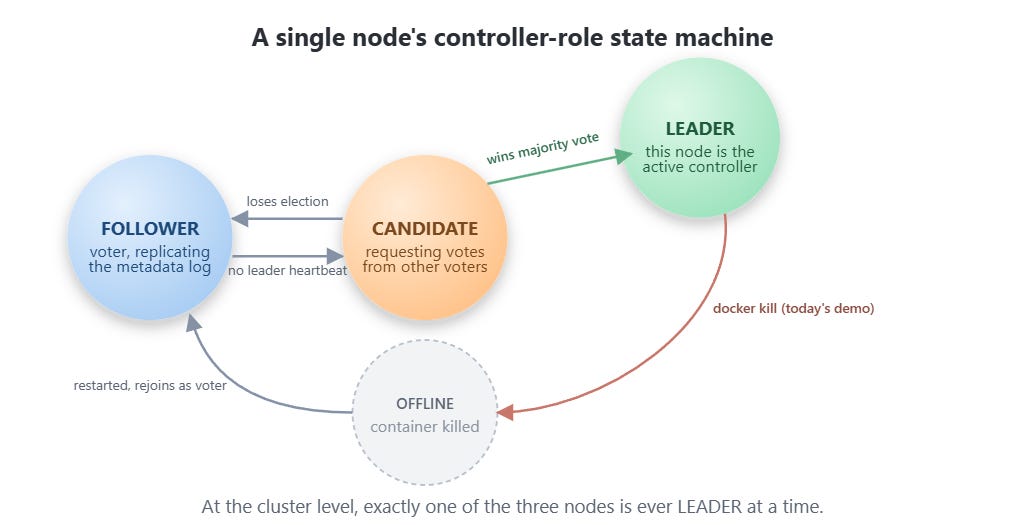
kafka-metadata-quorum describe --statusreports aLeaderIdamong the three voters. That’s the node currently deciding metadata changes.Kill it. Not a graceful shutdown —
docker kill, the same as pulling power on a physical machine. This is the failure mode worth testing, because graceful shutdowns are the easy case.Watch the survivors. With node availability down to two out of three, the surviving voters still hold a majority. They detect the missing leader, run a new election, and one of them becomes the new
LeaderId— typically within a few seconds.
The cluster’s client-facing brokers keep answering requests through all of this, because broker availability and controller leadership are separate concerns — losing the active controller doesn’t take the cluster offline, it just changes who’s writing the metadata log.
Implementation Guide:
GitHub Link :
https://github.com/sysdr/streamsocial-java/tree/main/day02-v2-streamsocial-source/streamsocial
Build, Verify, and Demo the Kafka Cluster
The idea, in pseudo-code
cluster = 3 nodes, each: process.roles = broker + controller
quorum_voters = {1@kafka-1:19093, 2@kafka-2:19093, 3@kafka-3:19093}

start():
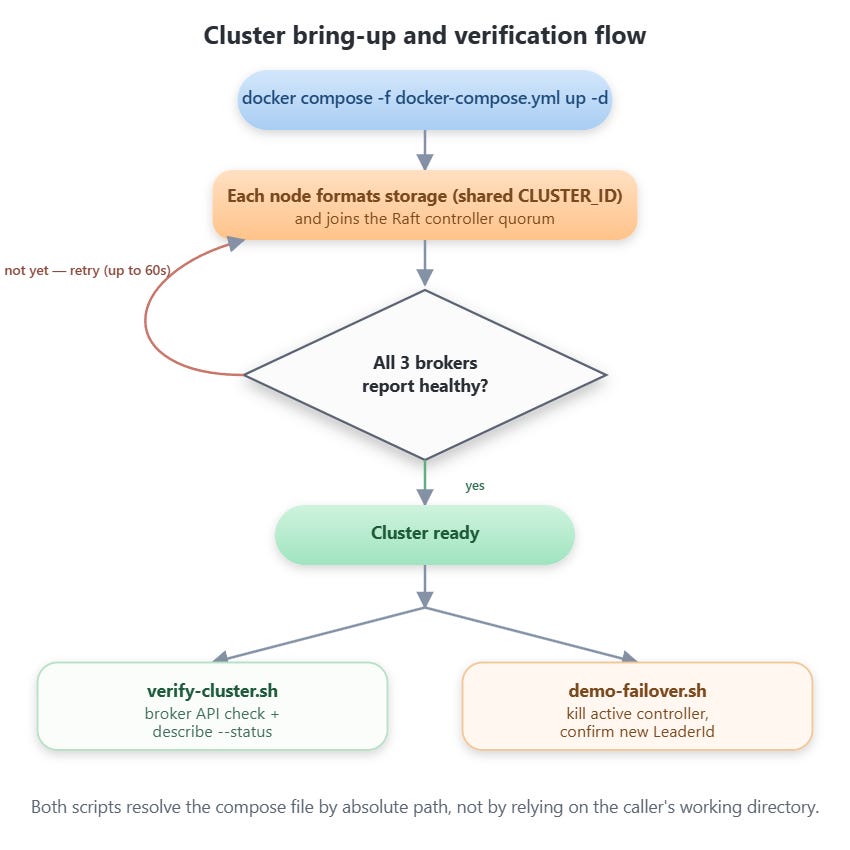
    for each node: format storage with shared CLUSTER_ID, join quorum
    wait until all nodes report healthy

describe_status():
    ask any broker: "who is the current controller leader?"
    -> LeaderId, CurrentVoters, LeaderEpoch

failover_demo():
    leader = describe_status().LeaderId
    kill(container_for(leader))
    poll a surviving node's describe_status() until LeaderId changes
    -> failover confirmed
    restart(container_for(leader))  # rejoins as follower
Three nodes, one shared quorum, one script that proves the quorum survives losing a member.
Step 1 — Unpack and start everything
cd streamsocial
./start.sh
Expected output: Maven dependency resolution, BUILD SUCCESS on streamsocial-common‘s tests, then all three streamsocial-kafka-N containers reporting healthy, ending with a cluster verification block. First run pulls the confluentinc/cp-kafka:7.7.1 image, so expect a longer wait the very first time.
Step 2 — Verify brokers and quorum directly
cd streamsocial-infra
./scripts/verify-cluster.sh
Expected output: an API version response from each broker, then a describe --status block. Confirm:
CurrentVoterslists node IDs1,2,3Exactly one
LeaderIdis reported
If any broker fails its health check, check its logs:
docker compose -f "$(pwd)/docker-compose.yml" logs kafka-2A common first-run cause is insufficient Docker memory — bump Docker Desktop’s allocation to at least 4GB and retry.
Step 3 — Demo controller failover (today’s challenge)
./scripts/demo-failover.shExpected output: the current quorum status, a line identifying and killing the active controller’s container, then a second describe --status block with a different LeaderId than the first. The script restarts the killed container automatically at the end.
Run verify-cluster.sh again afterward — all three nodes should show healthy and back in the voter set.
Step 4 — Stop everything
cd ..
./stop.sh
Data volumes persist by default, so a later ./start.sh picks the cluster back up with the same metadata. Use ./stop.sh --wipe to delete the volumes and force a clean re-format on next start.
Success criteria
./scripts/verify-cluster.sh shows all three brokers healthy and all three node IDs as controller quorum voters. ./scripts/demo-failover.sh shows a LeaderId change after the active controller’s container is killed, and the killed node rejoining as a follower once restarted. This is a pure infrastructure lesson with no application-level behavior yet, so today’s proof lives entirely in these two scripts’ terminal output — the live dashboard doesn’t arrive until Day 4, once there’s a running service worth watching.
Working Demo Link :
Homework
Modify docker-compose.yml to run a 5-broker cluster instead of 3, updating KAFKA_CONTROLLER_QUORUM_VOTERS and adding kafka-4 and kafka-5 service definitions with their own reserved external ports.
Implementation checklist:
Extend the
x-kafka-commonanchor’sKAFKA_CONTROLLER_QUORUM_VOTERSto list all 5 node IDs on their internal:19093controller listener.Add
kafka-4andkafka-5service blocks following the existing three as a template — newKAFKA_NODE_ID, new external host port (9095,9096— check these aren’t already claimed before using them elsewhere), new named volume.Update
scripts/start.sh‘s health-check loop to include the two new services.Run the failover demo against the 5-node cluster and kill two nodes in a row — with 5 voters, a majority is 3, so the cluster should survive losing 2.
Solution hints
The
CLUSTER_IDstays the same across all 5 nodes — it identifies the cluster, not a specific node.Each new broker needs a unique
KAFKA_NODE_ID, a unique external port, and its own volume — reusing a port or volume name collides with an existing container.Killing 2 out of 5 should still leave a working quorum (3 remaining voters, still a majority); killing 3 out of 5 should not — try that too and observe
describe --statusstall until a voter comes back, which is the concrete meaning of “quorum lost.”If a new port you pick for
kafka-4/kafka-5turns out to already be reserved for something later in the course, pick a different one and note the change — the reserved-ports list only helps if it’s kept current.
I had to make 2 changes:
1. Update the healthcheck endpoints for all 3 brokers to "kafka-3:19092" instead of "localhost:19092". Reason: Inside a Docker container, localhost resolves to 127.0.0.1, which doesn't route to the broker's actual listener port. By using the container's hostname on the Docker network (kafka-1, kafka-2, kafka-3), the healthcheck can properly connect and verify the broker is ready. This fixed the "unhealthy" status that was blocking startup.
2. Added & wait in verify-cluster.sh. Reason: The pipe to head -1 was causing the loop to hang after the first broker. By backgrounding the command and waiting for completion, each broker's check completes properly before moving to the next one. This fixed the script hanging mid-execution.
After making above changes, I was able to successfully run the Docker cluster along with 3 brokers on my machine.